Step 01
Drop the model in
A Rhino .3dm or an IFC from Revit or Archicad. ArchiTool reads the rooms, the windows and which way the building faces — no scripts, no Grasshopper, no setup.
Built inside a working practice · for architects and students
Drop a Rhino or IFC model in and get every angle in plain English — daylight, sun, wind, climate, envelope, site. Run the same tools from a panel inside Rhino, and when it's time to draw, turn the model into native elements and shop drawings inside Revit. Free to start, $19 to ship.
No sign-up to explore. No credit card. Browser tools need no install.
How it works
Most analysis tools assume you already know what sDA, ASE or U-value mean. ArchiTool doesn't. It is built so a third-year student can drop in a first model and walk away understanding the design better — and so a practice can answer the client's question the same afternoon.
Step 01
A Rhino .3dm or an IFC from Revit or Archicad. ArchiTool reads the rooms, the windows and which way the building faces — no scripts, no Grasshopper, no setup.
Step 02
Results land as a colour map on your floor plan and a few plain sentences: “this room is too dark”, “the south façade overheats in July”. The standards (sDA, ASE, U-value) sit in tooltips for when you want them.
Step 03
Widen a window, rotate the block, swap the glazing — see the new answer in seconds and iterate as fast as you sketch. Backed by LEED v4.1, ASHRAE 90.1 and ISO 6946, so the numbers are the ones your consultant would use.
Start with the question
Four in the browser (and in the Rhino panel), two inside Revit. Each one is free to try; the wider toolkit of 17 tools follows below.
Daylight
A daylight map of every floor from the massing — LEED-style sDA and ASE per room, glare-prone zones marked, a one-page PDF and the grid back into Rhino.
Checked against Radiance · LEED v4.1 daylight credits
Open Daylight →Sun Path & Shadow
Animated sun path over your model for any date, shadow coverage and sun-hours per façade, shadow outlines out as SVG, DXF or Rhino curves for the planning set.
Sun position checked against NREL's Solar Position Algorithm
Open Sun Path & Shadow →Climate Dashboard
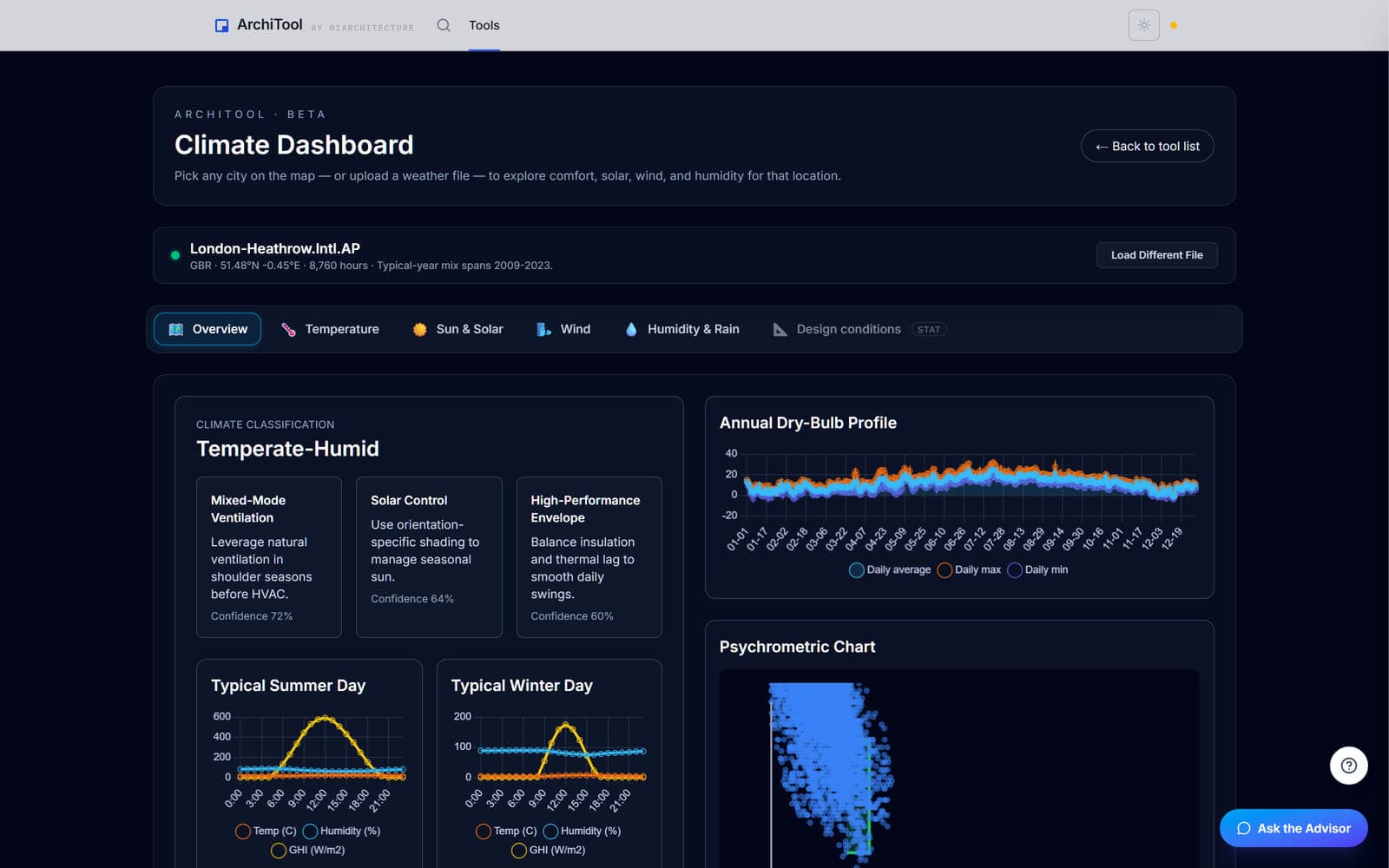
Pick the city or drop an .epw. Temperature, humidity, sun, wind and rain side by side, comfort hours, and the passive strategies that matter — before a line is drawn.
Free, no sign-in · checked against EnergyPlus weather data
Open Climate Dashboard →Urban Wind
Street-level wind comfort from your massing, solved on your own GPU in the browser. Annual comfort map at pedestrian height, gust safety check, 3D flow per direction.
Checked against OpenFOAM · runs on WebGPU, nothing uploaded
Open Urban Wind →Rhino → Revit
A layered .3dm becomes native Revit walls, floors, roofs, columns, beams, openings and terrain. Review what each object will become in 3D first, then send it.
Native Revit elements · Revit 2026 add-in, free to install
Open Rhino → Revit →Opening Shop Drawings
Select a door or window in Revit and get its elevation, jamb section, plan callout and schedule row laid out and dimensioned on your titleblock. One click per opening.
Revit add-in · 3 sheets free, then Pro
Open Opening Shop Drawings →Add-ins
One ArchiTool account, one plan. A dockable panel in Rhino runs the analyses on the model that is open and bakes the results back as geometry; a ribbon tab in Revit turns the model into native elements and drawings.
ArchiTool for Rhino
Rhino 8 · in testingNo export, no upload, no re-import. Pick the layers in the panel, run, and the result lands on named layers in your document — sun and shadow, solar and PV, daylight, site context, panelised SubD.
ArchiTool for Revit
Revit 2026 · free installerOne installer, one ribbon tab, one sign-in. A standard Windows setup that installs into your own add-ins folder — no admin rights, no IT ticket.
AI Advisor
When a daylight analysis finishes, click Ask the Advisor. It reads your actual rooms, answers in plain English and suggests specific changes to try — by name, with the numbers from your simulation.
Every number comes from your run
It looks metrics up with read-only tools against your latest result. Nothing is made up; if it estimates the effect of a change, it tells you to re-run to confirm.
Explains the jargon as it goes
Ask “what is sDA?” and get one paragraph in plain English with the LEED threshold for context. An advisor, not stamped engineering.
Daylight Advisor
Pro · grounded in your latest run
The toolkit
Site, sun, climate, BIM, presentation, feasibility — all from the same model, all working today. Most are free to try, with Pro for unlimited use.
Get the real world into your model.
Browse →
Where the light and the shadows land.
+1 more · Browse →
How the building will actually perform.
+3 more · Browse →
Move geometry between Rhino, Revit and IFC.
+1 more · Browse →
Turn the model into something a client can read.
Browse →
See all 17 tools →About Site Context Generator →About Daylight Analysis →
Pricing
Start free, forever. Students get a free educational license with unlimited runs — verify your academic email and you're set. One Pro plan when you're a working professional shipping deliverables to clients.
Nearly every tool, with sensible limits — feel the whole toolkit before you decide.
Verify with .edu / academic email
Free for students with a verified academic email — unlimited analysis, on us.
or $190 / year (save 17%)
For working architects who ship reports, models and drawings to clients.
The free educational license needs a verified academic email. It lasts a year and renews when you confirm you're still studying — graduate and your projects come with you.
Need seats for a studio, SSO, or a procurement contract? Talk to us.
Compare
The specialist tools are powerful, but they assume you're already an expert, they need a plugin and a host licence, and they cost like enterprise software. ArchiTool keeps the rigour and drops the friction.
| Tool | Typical price | Form factor | What you also need |
|---|---|---|---|
| ArchiTool Pro | $19 / month · $190 / year | Browser, any OS · free Revit add-in | Nothing. Drag-and-drop a .3dm or .ifc. |
| ClimateStudio (Solemma) | Quote-based; free for schools via a licence programme | Rhino plugin | Rhino licence, GPU |
| Pollination Rhino (Ladybug Tools) | $1,375 / year + cloud simulation credits | Rhino / Grasshopper plugin | Rhino licence, Grasshopper fluency |
| Sefaira (Trimble) | ~£1,700 / year (reseller); direct pricing on quote | SketchUp plugin | SketchUp Studio subscription |
| IES VE | Enterprise quote | Desktop application | Windows, training, IT setup |
Competitor prices are public-list or reseller references; current quotes may differ. ArchiTool Pro is listed pricing.
FAQ
Every tool is free to try, with a clear limit per tool — so you can sanity-check the whole toolkit before paying anything. Free accounts get 3 Daylight runs and 3 Wind runs a week, the basic U-Value library, Site Context with 1 km² sites and 5 previews a week, and 2 shop-drawing sheets in Revit. Pro removes the limits: unlimited runs, the full material library, 16 wind directions with CAD export, unlimited sheets, Showroom share links, epJSON export and the AI Advisor. Watermarks come off all exports too. Students get the analysis tools unlimited with a verified academic email.
A free Windows installer that adds one ArchiTool.ai tab to Revit 2026 with Rhino to Revit, Drawing Styles and Opening Shop Drawings. It installs into your own user add-ins folder, so no admin rights and no IT ticket. You sign in once with your ArchiTool account; the first 2 shop-drawing sheets are free, then it's Pro.
Yes. ArchiTool for Rhino is a dockable panel for Rhino 8: the tools read the model that is open, and results come back as geometry on named layers — no export, no upload. It ships through Rhino's Package Manager as an update to the 01A_Architool package and uses the same account and plan as the site. You don't need it to start: the browser tools read a .3dm directly.
No. The Advisor is a chat panel that opens after your daylight analysis finishes. It calls read-only tools against your actual run to fetch room metrics, definitions and LEED v4.1 compliance — every number it quotes is pulled from your simulation, not generated. If it estimates the effect of a design change, it always tells you to re-run to confirm. It's an advisor, not stamped engineering. The Advisor is a Pro feature; the calculator tools stay free.
No. ArchiTool is built for that exact moment. You drop in a model, see a colour map of your floor plan, and read sentences like “this room is below the recommended daylight level — try a larger window facing north.” The technical terms (sDA, U-value) appear in tooltips you can hover when you're curious — but you don't need them to use the tool.
The opposite — it's most useful in early concept and schematic design, when you can still change things. Use it to test “what if I rotate the building?” or “what if I add a courtyard?” while it's still cheap to change your mind. Then, when the design settles, the Revit add-in carries it into production.
Free educational license. Create an account, then confirm your academic email (.edu, .ac.uk, or another university domain) from your account page. The analysis tools are then unlimited at no cost; the AI features stay Pro-only and exports carry an educational watermark. The license lasts a year and renews when you confirm you're still studying — graduate and your projects come with you.
Rhino is the easiest input (just drop in a .3dm file), but you don't need a Rhino licence to use ArchiTool. You can also import IFC — so models from Revit, Archicad and other BIM tools work too.
Those are powerful tools for specialists who already know environmental analysis. ArchiTool is for the rest of us — architects and students who want fast, defensible feedback without learning a new language. For deep-physics validation studies, keep using Radiance.
The analysis tools compute in your browser, on your machine — daylight and wind run on your GPU — and the model is not sent to our servers to do it. Two things you choose do leave your machine: publishing a Showroom share link stores that model with us so the link works, and sending a result to Revit passes it through our bridge to your add-in. Nothing else is uploaded.
Yes. Cancel any time from the Stripe customer portal. Your account stays on the free tier — your past analyses are not deleted.
Walk straight in — no sign-up to explore, no credit card. The fastest way to find out whether your design is doing what you think it's doing.
Open the tools →