Free
$0
forever, for learning and personal work
- Every export format
- Nothing to install
Place a point on the model and read the share of the sky dome it can see, the diffuse daylight reaching it from the site's climate sky, and every hour of sun and shadow across the year — then take the sky dome back into Rhino.
Free to try, no account for the preview. First result under 2 min.
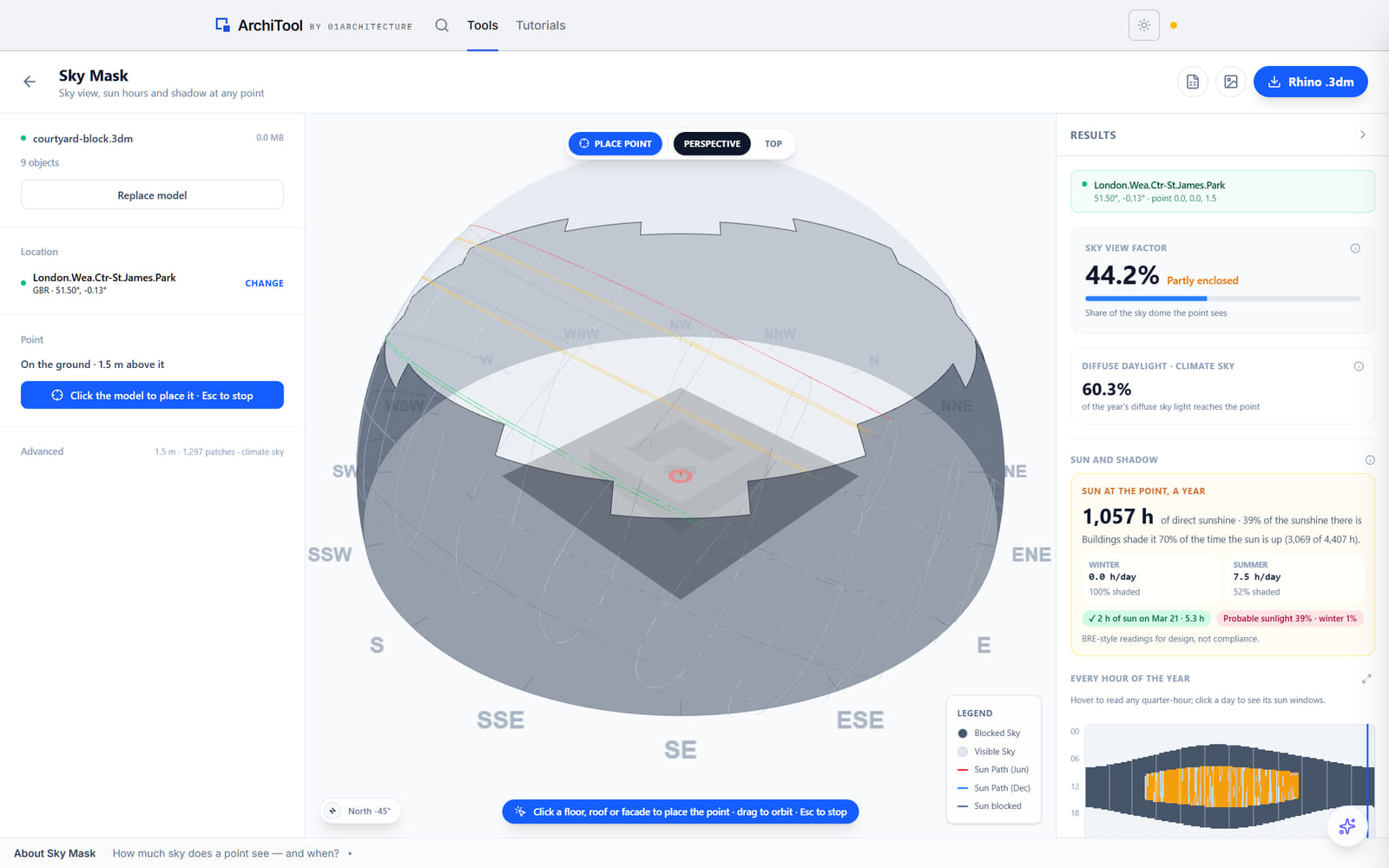
Sky, measured at a point
Click the ground, a floor, a roof or a facade and read the share of the sky dome the point sees.
Sun and shadow, all year
Every hour of sun and shadow at the point, with winter and summer summaries.
Diffuse daylight, from the climate
The same mask weighted by the site's climate sky, where an overhang costs more than a distant wall.
Built in your browser
The model is parsed locally; it goes to Rhino only when you export it.
Sky and sun at a point
Stand at a point on the model and the tool measures how much of the sky dome is visible, how much of the site's diffuse daylight reaches it, and how many hours of sun and shadow it gets across the year.
The sky view factor reads the geometry; the diffuse reading weights the same mask by the site's climate sky, so an overhang costs more than a distant wall. The every-hour chart shows the whole year at the point — direct sun, sun behind cloud, and shade from buildings — and the probable-sunlight readings are labelled BRE-style for design, not compliance.
Sky view factor
The share of the sky dome the point sees
Diffuse daylight
The same mask weighted by the site's climate sky
Sun and shadow, all year
Every hour at the point, winter and summer
Plans
Every reading and every export is open on every plan.
Free
$0
forever, for learning and personal work
Pro
$29
per month, or $290 a year
Education
Free
with a verified academic email
Limits shown are the live ones for this tool. Free and Education are for learning and personal exploration; client and commercial work needs Pro. See the terms. Want the method and its limits? Read the tutorial.
Export formats
The sky dome, sun path and compass leave with your model as one Rhino file, the every-hour sun data leaves as a spreadsheet, and the top view as an image.
The .3dm opens in Rhino; the CSV in any spreadsheet; the PNG in any document.
Rhino
The sky dome, sun path and compass with your model, on their own layers, or baked straight into the open document.
A spreadsheet
Every hour of the year at the point, for your own charts.
Your point
A drawing or a report
The top view of the mask as an image.
FAQ
Everything about data, formats and plans. Still curious? The tutorial goes deeper, and the Report button inside the tool reaches us.
A model as a Rhino .3dm, the site's weather station (or your own .epw), and a point to measure — click Place point on the model, or type coordinates. The point sits 1.5 m above a floor or roof by default, and just outside a facade it measures the sky a window there sees.
The sky dome, sun path and compass leave with your model as one Rhino .3dm, or bake straight into the open document; the every-hour sun data leaves as CSV, and the top view as a PNG.
It is the share of the sky dome the point can see. The tool also weights the same mask by the site's climate sky, so it reports how much of the year's diffuse daylight reaches the point.
Every hour of the year at the point, split into direct sun, sun behind cloud and shade from buildings, with winter and summer summaries for each.
No. The sky view, sun hours and shadow are read at a single point, and the probable-sunlight readings are labelled BRE-style for design, not compliance.
No. The model is parsed in your browser and leaves only when you export it back to Rhino.
How much sky a window really sees, before the daylight engineer asks.